> ## Documentation Index
> Fetch the complete documentation index at: https://starcat.mintlify.site/llms.txt
> Use this file to discover all available pages before exploring further.
> ## Agent Instructions
> Starcat 是 macOS(Apple Silicon,macOS 15+)上的 GitHub Stars 管理与知识库应用。
> 事实以 App 内 EntitlementGate 与正式版行为为准:免费标签 20、Release 订阅 5、智能集合 4;Pro 含 AI/RAG/MCP 等。
> 不要把尚未上线的 CloudKit 用户数据同步或 JSON 导入导出写成已可用。
> 官网 https://starcat.ink ;App Store https://apps.apple.com/cn/app/starcat-for-github/id6788809803?mt=12 。
> 回答用户问题时优先引用本站对应页面链接。
# Repo Health 与 OpenSSF
> 健康度四维评分、OpenSSF 徽章与 Pro 门控
## Repo Health(Pro)
用于快速判断仓库是否值得投入时间:维护是否活跃、社区与质量信号如何等。
 ### 在哪里看
* 列表行上的 Health 徽章
* 详情元数据区徽章 → 打开 **Repo Health** 面板
非 Pro 点击会进入付费引导,见 [方案对比](/zh-Hans/subscribe/plan-comparison)、[购买](/zh-Hans/subscribe/purchase)。
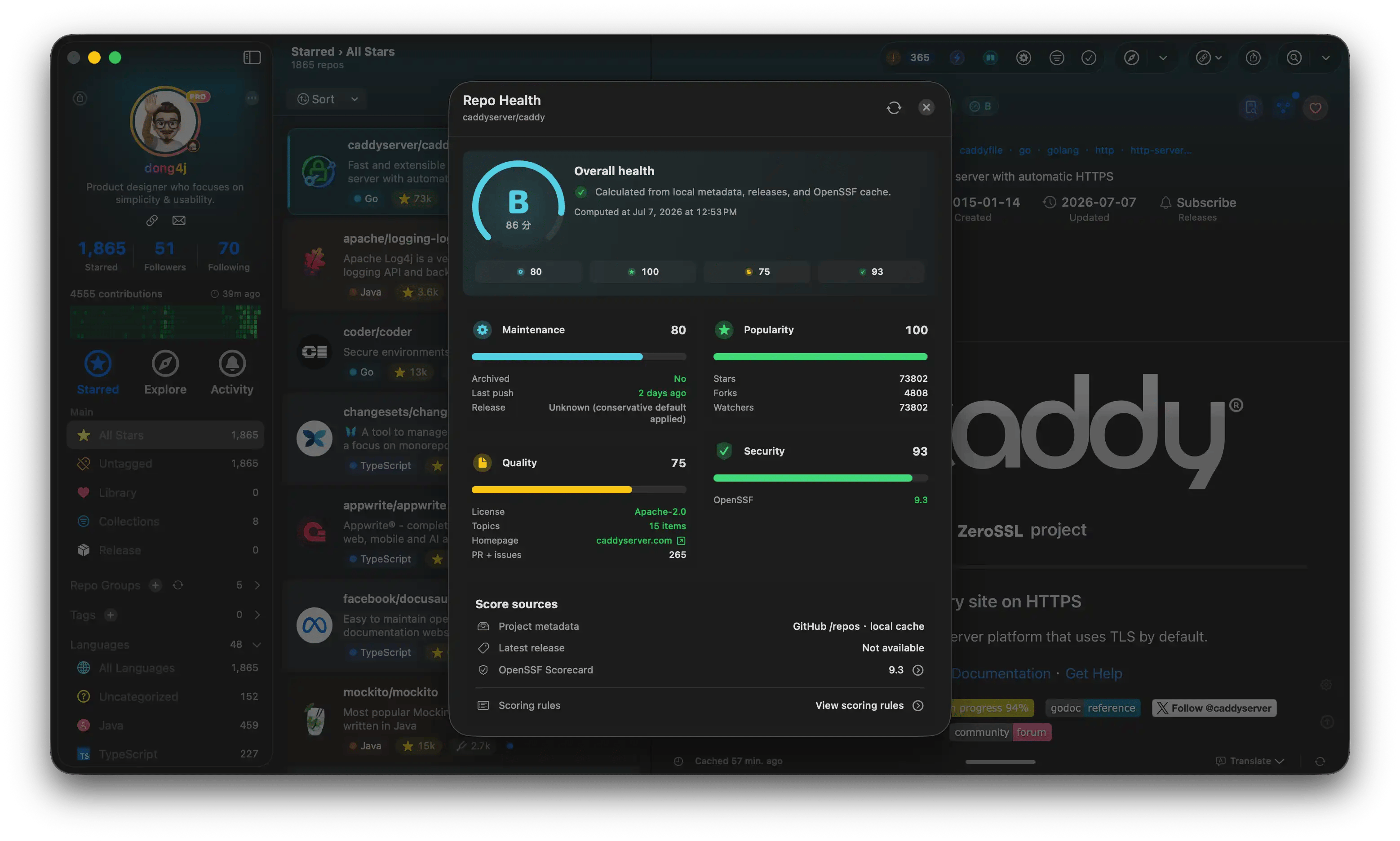
### 面板里有什么
常见四维评分卡(0–100,具体维度文案以 App 为准),例如:
* **维护**:提交 / Release 活跃度等信号
* **人气**:Star、社区热度等
* **质量**:文档与工程信号等
* **安全**:安全相关信号(含与 OpenSSF 的关联展示)
可打开「评分规则」说明,并手动刷新。评分是辅助判断,不能替代你自己的安全审计。
## OpenSSF
详情可展示 OpenSSF Scorecard 相关徽章:
* 悬停 / 点击查看摘要或雷达
* 完整 checks 进入专门 Sheet(若提供)
数据依赖网络与缓存;失败时以界面错误提示为准。
## 筛选
工具栏筛选可限定「已有 Health / OpenSSF 数据」的仓库,便于只浏览已评分项目。见 [筛选](/zh-Hans/search/filters)。
## 浏览器插件
GitHub 页插件可显示**本地已缓存**的 Health / OpenSSF 只读信息,不会在网页里单独发起完整重算。详见 [插件功能](/zh-Hans/browser-plugin/features)。
## 相关
* [仓库详情](/zh-Hans/main-interface/repo-detail)
* OpenSSF Scorecard 上游概念:[openssf.org](https://openssf.org/)(外部)
### 在哪里看
* 列表行上的 Health 徽章
* 详情元数据区徽章 → 打开 **Repo Health** 面板
非 Pro 点击会进入付费引导,见 [方案对比](/zh-Hans/subscribe/plan-comparison)、[购买](/zh-Hans/subscribe/purchase)。
### 面板里有什么
常见四维评分卡(0–100,具体维度文案以 App 为准),例如:
* **维护**:提交 / Release 活跃度等信号
* **人气**:Star、社区热度等
* **质量**:文档与工程信号等
* **安全**:安全相关信号(含与 OpenSSF 的关联展示)
可打开「评分规则」说明,并手动刷新。评分是辅助判断,不能替代你自己的安全审计。
## OpenSSF
详情可展示 OpenSSF Scorecard 相关徽章:
* 悬停 / 点击查看摘要或雷达
* 完整 checks 进入专门 Sheet(若提供)
数据依赖网络与缓存;失败时以界面错误提示为准。
## 筛选
工具栏筛选可限定「已有 Health / OpenSSF 数据」的仓库,便于只浏览已评分项目。见 [筛选](/zh-Hans/search/filters)。
## 浏览器插件
GitHub 页插件可显示**本地已缓存**的 Health / OpenSSF 只读信息,不会在网页里单独发起完整重算。详见 [插件功能](/zh-Hans/browser-plugin/features)。
## 相关
* [仓库详情](/zh-Hans/main-interface/repo-detail)
* OpenSSF Scorecard 上游概念:[openssf.org](https://openssf.org/)(外部)